
Key Takeaways
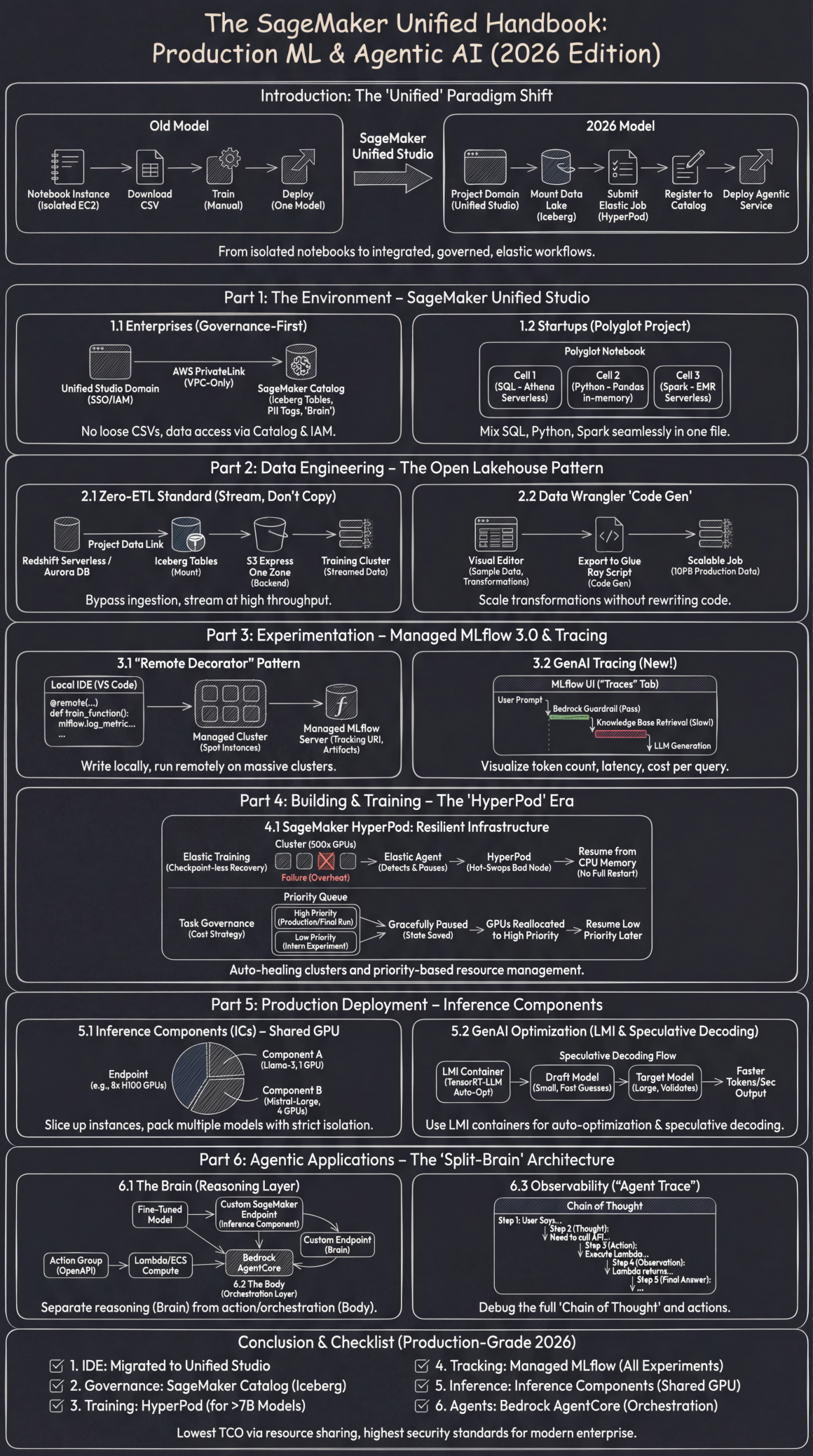
- The Future is Unified: The default developer environment in 2026 is SageMaker Unified Studio, an integrated platform that combines data governance (DataZone), coding assistance (Amazon Q), and ML compute into a single, governed workspace.
- Governance is Proactive, Not Reactive: For enterprises, the SageMaker Catalog and VPC-Only Mode with AWS PrivateLink are standard. Data access is automatically controlled through metadata tags, moving security from a checklist to a built-in feature.
- Large-Scale Training Requires Resilience: For foundation models (>7B parameters), SageMaker HyperPod is mandatory. Its “checkpoint-less” recovery and priority queues make large-scale training resilient to hardware failures and cost-effective.
- Inference is Shared, Not Dedicated: The era of “one model, one endpoint” is over. Inference Components (ICs) are the new standard, allowing multiple models to be deployed on a single, shared GPU instance to dramatically increase utilization and lower costs.
- Agents Use a “Split-Brain” Architecture: Production-grade agents are built by separating the reasoning “Brain” (a custom-tuned model on a SageMaker Endpoint) from the orchestration “Body” (Bedrock AgentCore), enabling specialized intelligence with robust tool use.
- Data is Streamed, Not Copied: The “Zero-ETL” pattern using SageMaker Lakehouse Integration allows training jobs to stream data directly from sources like Redshift via Apache Iceberg, eliminating the need for slow and costly data ingestion pipelines.
The New Ecosystem of AI Development – SageMaker Unified Studio
The first paradigm shift in 2026 for any team serious about machine learning is the mandatory adoption of SageMaker Unified Studio. This is not merely an updated user interface; it represents the convergence of previously siloed AWS services into a single, cohesive, and governed workspace. It integrates the data governance of Amazon DataZone, the AI-powered coding assistance of Amazon Q Developer, and the full breadth of AWS analytics and ML compute (Amazon EMR, Redshift, AWS Glue, and SageMaker itself) into one environment. This move addresses the core enterprise challenges of fragmented tools, inconsistent security postures, and barriers to collaboration.


For Enterprises: A Governance-First Mandate
For large, regulated organizations, the days of “Shadow AI” and uncontrolled data sprawl are over. The 2026 architecture enforces governance by design, making compliance the path of least resistance.
- The Unified Studio Domain Strategy: The fundamental unit of organization is no longer an individual user but a Unified Studio Domain. This domain is directly integrated with AWS IAM Identity Center (the evolution of AWS SSO), allowing administrators to manage users, groups, and access policies centrally. This approach ensures that permissions are tied to enterprise identities, not transient ML experiments.
- Airtight Network Isolation with PrivateLink: The default, non-negotiable standard for enterprise deployments is the “VPC-Only Mode”. All network traffic generated by Unified Studio—from notebook kernels to data queries—is forced through AWS PrivateLink endpoints. This architecture completely walls off the environment from the public internet, meaning sensitive data never traverses public networks. Installation of Python packages or other dependencies is handled via curated, private repositories like AWS CodeArtifact, which mirror approved public sources, preventing the accidental introduction of insecure or unvetted code.
- SageMaker Catalog: The Enterprise AI Brain: The SageMaker Catalog, built upon the foundation of Amazon DataZone, has become the central nervous system for all data and ML assets. It replaces the older, isolated SageMaker Feature Store. Its power lies in its automated, governance-driven integration with the data lake.
- How It Works: When a data engineer registers a new Apache Iceberg table in the AWS Glue Data Catalog, it is automatically discovered and populated within the SageMaker Catalog. Administrators or data stewards then enrich this technical metadata with crucial business context by assigning tags (e.g.,
sensitivity:PII,dept:finance,retention:3-years). This metadata is now active. If a data scientist attempts to access a PII-tagged table from a notebook without possessing the corresponding IAM role, the SageMaker Catalog, respecting the DataZone policies, will prevent the access or even hide the data from view entirely within the Studio interface. This provides proactive, automated governance, moving security from a reactive checklist item to an intrinsic property of the platform.
- How It Works: When a data engineer registers a new Apache Iceberg table in the AWS Glue Data Catalog, it is automatically discovered and populated within the SageMaker Catalog. Administrators or data stewards then enrich this technical metadata with crucial business context by assigning tags (e.g.,
For Startups: The “Polyglot” Project for Maximum Velocity
Startups thrive on speed and capital efficiency. The “Polyglot Notebook” in Unified Studio is a game-changer for rapid prototyping and iteration, allowing a single developer to seamlessly switch between SQL, Python, and Spark within one file, using the best engine for each specific task without managing complex infrastructure.
Workflow in Action:
Cell 1 (SQL for Exploration): A data analyst can instantly explore data in the lakehouse. The %%sql magic command runs the query directly on Amazon Athena Serverless, requiring zero setup or cluster management. The results are immediately available to the notebook environment.
%%sql SELECT user_id, product_id, event_type FROM "glue_db"."customer_interactions_iceberg" WHERE event_date > '2026-01-01' LIMIT 1000Cell 2 (Python for Detailed Analysis): A data scientist can pull the query result into a Pandas DataFrame with zero friction. The _sql_result object is automatically populated, allowing for immediate in-memory analysis using familiar libraries.
import pandas as pd

df = _sql_result.to_pandas()

print(df['event_type'].value_counts())
Cell 3 (Spark for Heavy Lifting): If the analysis requires processing a terabyte-scale dataset that exceeds local memory, the developer can hand off the computation to a distributed cluster with another magic command. The %%pyspark cell transparently submits the code to an EMR Serverless backend, which spins up, executes the job, and spins down automatically, optimizing for cost.
The Open Lakehouse Pattern – Stream, Don’t Copy
By 2026, the practice of physically copying terabytes of data from a data warehouse to an ML training environment’s local storage is considered a costly and inefficient anti-pattern. The modern approach is to stream data directly from a single source of truth: the open lakehouse.
The Zero-ETL Standard
For the vast majority of ML use cases, especially with tabular data, building and maintaining brittle ETL (Extract, Transform, Load) pipelines is a thing of the past. AWS now provides fully managed Zero-ETL integrations that make data available for analytics and ML the moment it’s created.
- Feature & Implementation: This capability, branded as SageMaker Lakehouse, allows you to define a “Project Data Link”. This link doesn’t move data; instead, it virtually mounts tables from sources like Redshift Serverless or even third-party SaaS applications (like Salesforce or Zendesk) as queryable Apache Iceberg Tables in your AWS Glue Data Catalog.
- Performance at Scale: During model training, the SageMaker job directly streams data from these Iceberg tables. This process is supercharged by the S3 Express One Zone storage class, which serves as an ultra-high-throughput backend, delivering data to the training cluster with single-digit millisecond latency. This bypasses the entire “data ingestion” phase, saving significant engineering effort and accelerating the time from data creation to model training.
Feature Engineering with Data Wrangler “Code Gen”
The visual Data Wrangler tool has matured from a simple UI for data sampling into a sophisticated Code Generator for production-scale feature engineering.
The Production Workflow:
- A data scientist interactively applies transformations (e.g., “Impute Missing Values,” “Vectorize Text using Bedrock Titan Embeddings”) on a data sample in the visual editor.
- Once satisfied, they click “Export”.
- SageMaker generates a production-ready Python script specifically optimized to run as an AWS Glue job using the Ray runtime. This is critical because it allows the exact same logic tested on a 1GB sample to be deployed on a 10PB production dataset without any code changes, ensuring consistency and scalability from development to production.
Experimentation Reimagined – Managed MLflow 3.0 and Universal Tracing
To foster open standards and interoperability, AWS has fully embraced MLflow as the core engine for experiment management, deprecating its older proprietary “SageMaker Experiments” API. In 2026, all serious experimentation is tracked in Managed MLflow.
The “Remote Decorator” Pattern: Local IDE, Cloud Compute
This feature has become the single greatest productivity multiplier for data scientists. It allows them to write, debug, and iterate on code within their preferred local environment (like VS Code) while executing it on massive, on-demand cloud clusters.
The Code in Practice: The @remote function decorator from the SageMaker Python SDK abstracts away all the complexity of environment configuration, dependency management, and script execution.
from sagemaker.remote_function import remote
import mlflow

# Define the remote cluster config. Spot instances are used to slash costs for non-urgent experiments.
@remote(instance_type="ml.p5.48xlarge", keep_alive_period_in_seconds=3600)
def train_llm_chapter(chapter_text, lr, epochs):
    # The tracking URI is automatically configured to point to the project's Managed MLflow Server
    mlflow.set_tracking_uri("arn:aws:sagemaker:us-east-1:1234567890:mlflow-tracking-server/my-project-server")

    with mlflow.start_run(run_name=f"train_chapter_lr_{lr}"):
        mlflow.log_param("learning_rate", lr)
        mlflow.log_param("epochs", epochs)

        # ... standard PyTorch FSDP training code ...
        # The code executes on the remote p5.48xlarge instance
        model, final_loss = run_training(chapter_text, lr, epochs)

        mlflow.log_metric("final_loss", final_loss)

        # Log the model artifacts directly to S3 via MLflow, which handles the URI mapping
        mlflow.pytorch.log_model(model, "model")

    return model

# This function call feels local, but the execution happens on the remote cluster
trained_model = train_llm_chapter(my_text_data, 1e-5, 3)
Universal GenAI Tracing: Debugging the “Why”
For complex GenAI applications, especially agents that make multiple sequential calls, simple metrics are not enough. Tracing is now a mandatory component for observability. MLflow has become the universal standard for this.
What It Captures: By enabling MLflow’s autologging capabilities, every step of a GenAI chain is captured. This includes the latency of each hop (e.g., the time spent in a RAG knowledge base retrieval versus the time spent in LLM generation), token counts for inputs and outputs, and the estimated cost per query.
Effortless Implementation: A single line of code enables this deep observability for popular frameworks. It supports auto-tracing for multiple integrations simultaneously, creating a unified view.
import mlflow

# Enable automatic tracing for both Bedrock and LangChain calls
mlflow.bedrock.autolog()
mlflow.langchain.autolog()
Intuitive Visualization: In the Unified Studio’s MLflow UI, a new “Traces” tab provides a complete waterfall view of any given interaction. A developer can click on a single problematic agent response and see the entire “chain of thought”: User Prompt -> Bedrock Guardrail (Pass) -> Knowledge Base Retrieval (Slow!) -> LLM Generation (High Token Count) -> Final Answer. This makes debugging complex agentic behavior dramatically simpler.
The HyperPod – Building and Training at Hyperscale
The landscape for model training has decisively bifurcated. For smaller models (under 7 billion parameters), standard SageMaker Training Jobs remain a cost-effective choice. However, for the large-scale efforts that define modern AI—training or fine-tuning foundation models—SageMaker HyperPod is no longer optional; it is the mandatory infrastructure.
SageMaker HyperPod: Self-Healing, Resilient Infrastructure
Training a model like Llama-4 or a custom variant requires orchestrating thousands of GPU or Trainium accelerators for weeks or even months. On such a timeline, hardware failures are not a risk; they are a certainty. HyperPod is AWS’s purpose-built infrastructure designed to make these large-scale training runs resilient to failure. It provides a managed environment built on either Amazon EKS (Kubernetes) or Slurm for cluster orchestration.
- The Core Feature: “Checkpoint-less” Elastic Training: In the past, a single GPU overheating could force a training job to restart from its last saved checkpoint, often losing hours of progress. The 2026 workflow, enabled by HyperPod, is fundamentally different.
- The Failure Scenario: A GPU node in a 512-node cluster fails.
- The HyperPod Magic: Instead of the entire job crashing, HyperPod’s control plane detects the failure in seconds. An Elastic Agent running within the training script pauses the remaining nodes. HyperPod automatically hot-swaps the faulty node with a healthy one from a warm pool. The training job then resumes directly from the other nodes’ CPU memory, a process called “direct memory hydration,” without needing to reload the entire state from a slow disk checkpoint. This reduces recovery time from hours to sub-minute intervals, saving up to 40% of total training time that would otherwise be lost to failures.
- Cost Optimization through “Task Governance”: HyperPod introduces sophisticated Priority Queues and Task Governance policies to maximize the utilization of these immensely expensive GPU clusters.
- Setup: An administrator defines quotas and priority classes (e.g.,
High-Priority: Production-Retraining,Low-Priority: Intern-Experiment) for a shared cluster. - Dynamic Preemption: When a high-priority job enters the queue, HyperPod can gracefully pause a lower-priority job, save its full state, and reallocate its GPUs to the more urgent task. Once the high-priority job completes, the resources are returned, and the paused job resumes automatically as if nothing happened. This system, known as elastic training, allows workloads to dynamically scale up to use idle capacity and scale down when needed, ensuring the cluster is always driving maximum value.
- Setup: An administrator defines quotas and priority classes (e.g.,
Production Deployment Revolution – Inference Components & Optimization
The “one model, one endpoint” deployment strategy is financially unviable for the world of 2026. Hosting dozens of specialized LLMs, each on its own dedicated GPU instance, leads to massive underutilization and exorbitant costs.
The New Standard: Slicing GPUs with Inference Components (ICs)
Inference Components (ICs) are the default deployment pattern, allowing you to treat a single, powerful GPU instance as a shared resource that can host multiple, fully isolated models. This approach dramatically increases GPU utilization and can reduce inference costs by up to 8x.
How it Works:
- The Endpoint: You provision the physical hardware, such as a single
p5.48xlargeinstance with 8x H200 GPUs. - The Components: You then deploy individual models as “components” onto that endpoint. For example, “Component A” (a fine-tuned Llama-3-8B model) is allocated 1 GPU, while “Component B” (a larger Mistral-Large model for complex reasoning) is allocated 4 GPUs on the same instance.
- Guaranteed Isolation: SageMaker, leveraging technologies like NVIDIA Triton Inference Server’s concurrent model execution, guarantees strict memory and compute isolation. A sudden traffic spike to the Llama-3 component cannot steal VRAM or compute cycles from the Mistral-Large component, ensuring predictable performance for all models. Auto-scaling can be configured on a per-component basis, allowing each model to scale its resource reservation independently.
Automated GenAI Optimization: LMI Containers and Speculative Decoding
In 2026, ML engineers rarely write their own inference serving code. Instead, they leverage AWS’s purpose-built Large Model Inference (LMI) containers, which bundle state-of-the-art optimizations.
- Auto-Optimization with TensorRT-LLM: When a model is deployed using an LMI container, the container automatically inspects the underlying hardware and applies the most effective optimizations. For NVIDIA GPUs, this involves on-the-fly compilation using TensorRT-LLM, which can apply techniques like FP8 quantization and continuous batching to reduce latency by over 30% and improve throughput by over 60% on average.
- Speculative Decoding for Faster Output: This technique has become a standard feature for reducing perceived latency. You deploy a small, fast “draft model” alongside your large, powerful “target model.” For each token, the draft model rapidly generates a few likely candidates. The large model then validates these candidates in a single, parallel step, which is significantly faster than generating tokens sequentially. This can yield a 2-3x speedup in tokens-per-second with no degradation in output quality.
Building Agentic Applications – The “Split-Brain” Architecture
The pinnacle of the 2026 ML workflow is the creation of “Agents”—AI systems capable of orchestrating tools to accomplish complex tasks, such as a support bot that can process refunds or an analyst bot that can query databases and generate reports. The robust, production-grade architecture for this is the “Split-Brain” model.
The Brain (Reasoning Layer): The Custom SageMaker Endpoint
For any serious enterprise application, the agent’s reasoning should not come from a generic public model. The “Brain” must be a model that has been fine-tuned on the company’s private data, internal jargon, and compliance rules. This fine-tuned model is deployed as a secure SageMaker Inference Component (as described in Part 5), creating a custom, proprietary reasoning engine.
The Body (Orchestration Layer): Bedrock AgentCore
Developers no longer write brittle while loops and complex state management logic in Python to control an agent. This entire orchestration layer is now managed by Bedrock AgentCore, the enterprise-ready evolution of Bedrock Agents.
Step-by-Step Implementation:
- Define Action Groups: You describe your internal APIs and tools using a standard OpenAPI (Swagger) schema. This schema defines functions like
GET /refund-statusorPOST /initiate-return. - Link to Compute: You connect these API definitions to their actual implementations, which are typically serverless AWS Lambda Functions or ECS Tasks.
- Connect the Custom Brain: In the Bedrock AgentCore console or API, when selecting the model for the agent, you choose the option to “Import from SageMaker.” You then provide the ARN of the custom-tuned “Brain” endpoint you deployed in the previous step.
- Deploy: Bedrock AgentCore handles all the undifferentiated heavy lifting: constructing the sophisticated prompts (“You are a helpful agent…”), managing the conversational memory, invoking the correct tools based on the brain’s reasoning, and handling errors and retries.
Observability: The “Agent Trace”
When an agent inevitably fails in production, debugging requires more than logs; it requires a complete “Agent Trace.” This functionality is now deeply integrated between SageMaker, Bedrock, and MLflow.
Visualizing the Chain of Thought: The MLflow Tracing UI provides a hierarchical, expandable view of the agent’s entire decision-making process for a given request. A developer can clearly see:
- Step 1 (User Says): “Refund my last order.”
- Step 2 (Thought): Model output: “I need to find the user’s Order ID. I will call the
list_orderstool.” - Step 3 (Action): AgentCore executes the
list_ordersLambda function. - Step 4 (Observation): The Lambda returns
{"order_id": "123", "status": "Delivered"}. - Step 5 (Final Answer): The agent composes its response: “I found Order 123. Shall I proceed with the refund?”
This granular, step-by-step visibility makes it possible to root-cause failures, diagnose hallucinations, and optimize the agent’s behavior with precision.
Conclusion & Production-Grade Checklist for 2026
Achieving “production-grade” status in the AWS machine learning ecosystem of 2026 requires a complete adoption of this unified and governed methodology. Ensure your organization has successfully transitioned across these key pillars:
✅ IDE: All development has migrated from siloed notebooks to the collaborative Unified Studio.
✅ Governance: All data access is arbitrated through the SageMaker Catalog and its underlying Apache Iceberg tables, eliminating loose, ungoverned data files.
✅ Training: All large-model training (>7B parameters) relies on SageMaker HyperPod for its resilience and resource management capabilities.
✅ Tracking: Every experiment, from simple regressions to complex LLM fine-tuning runs, is logged and traced in Managed MLflow.
✅ Inference: All models are deployed via Inference Components to maximize GPU utilization and minimize cost.
✅ Agents: All agentic applications use Bedrock AgentCore for orchestration, with custom SageMaker Endpoints serving as the specialized reasoning “brain.”
This integrated architecture represents the pinnacle of modern ML development on AWS, delivering the lowest possible total cost of ownership (TCO) through radical resource sharing while upholding the highest security, governance, and observability standards required by any modern enterprise.
Frequently Asked Questions
What is AWS SageMaker Unified Studio?
SageMaker Unified Studio is the integrated development environment for ML and AI on AWS in 2026. It unifies data governance tools (like Amazon DataZone), AI coding assistants (Amazon Q Developer), and a wide range of AWS compute services (SageMaker, EMR, Redshift) into a single, cohesive interface. It replaces older, fragmented workflows that required developers to switch between multiple tools.
How does AWS make large-scale model training more resilient?
AWS uses SageMaker HyperPod to manage large-scale training. Its key feature is “elastic training” with checkpoint-less recovery. If a GPU node fails during a multi-week training run, HyperPod automatically detects it, hot-swaps the faulty hardware, and resumes the job from memory in minutes, rather than restarting from a checkpoint that could be hours old. This dramatically reduces time lost to hardware failure.
How can I reduce the cost of hosting multiple LLMs on AWS?
The most effective strategy is to use SageMaker Inference Components (ICs). Instead of deploying each model to its own expensive GPU endpoint, ICs allow you to “slice up” a single large GPU instance and host multiple, isolated models on it simultaneously. This significantly increases GPU utilization and can reduce inference costs by up to 80%.
What is the “Split-Brain” architecture for AI agents on AWS?
The “Split-Brain” architecture is a production pattern for building sophisticated agents. It involves separating the Reasoning Layer (“The Brain”) from the Orchestration Layer (“The Body”). The “Brain” is typically a custom model fine-tuned on your private data and hosted on a SageMaker Endpoint. The “Body” is Bedrock AgentCore, which handles the complex logic of tool use, state management, and conversation flow, directed by the custom brain.
What does “Zero-ETL” mean in the context of SageMaker?
A “Zero-ETL” pattern in SageMaker means eliminating the need to build separate pipelines to copy data for model training. Through SageMaker Lakehouse Integration, data from sources like Amazon Redshift can be made directly available to a training job as an Apache Iceberg table. The training job then streams the data at high speed, bypassing the entire data ingestion step and accelerating the workflow.